
By Princess Jones
Managing social media is tough. It’s not just about the content you’re sharing. You also have to worry about keeping your follower/following counts in good standing. And if you want to grow your following, you’ll need some help targeting the right accounts.
Crowdfire is a web-based app that helps you manage followers on Instagram and Twitter. You can use it to get some insight into who’s following you and finding new followers to interact with. Although the features are robust, it’s a pretty simple to use app.
Who’s Following You and Who’s Not
The easiest thing to do with Crowdfire is track who is following you and who’s not. On the left side of the screen, you’ll see several options in the menu: Non Followers, Fans, Recent Unfollowers, and Recent Followers. Non Followers are accounts you follow but don’t follow you. Fans are the ones that follow you but you don’t follow. And the other two are exactly what they sound like. Click on each one to get a list of the accounts that fit that criteria. You’ll get an avatar, a username, a bio, and following/follower summary on each one. On the right side of the screen, you’ll see the option to either follow or unfollow each account.
Keep in mind that Crowdfire works as a syncing service. The first time you use it, you won’t be able to tell who has unfollowed you or followed you recently. But after you’ve synced that first time, each time you open the platform, you’ll be able to see these stats.
You’ll also be able to see a list of the accounts you follow sorted from the least active to the most active. You can toggle between those inactive for more than a month, more than three months, and more than six months. If you’re trying to get rid of dead weight, you can unfollow each account directly from the right side of the page.
Copying Followers and #Keyword Follow
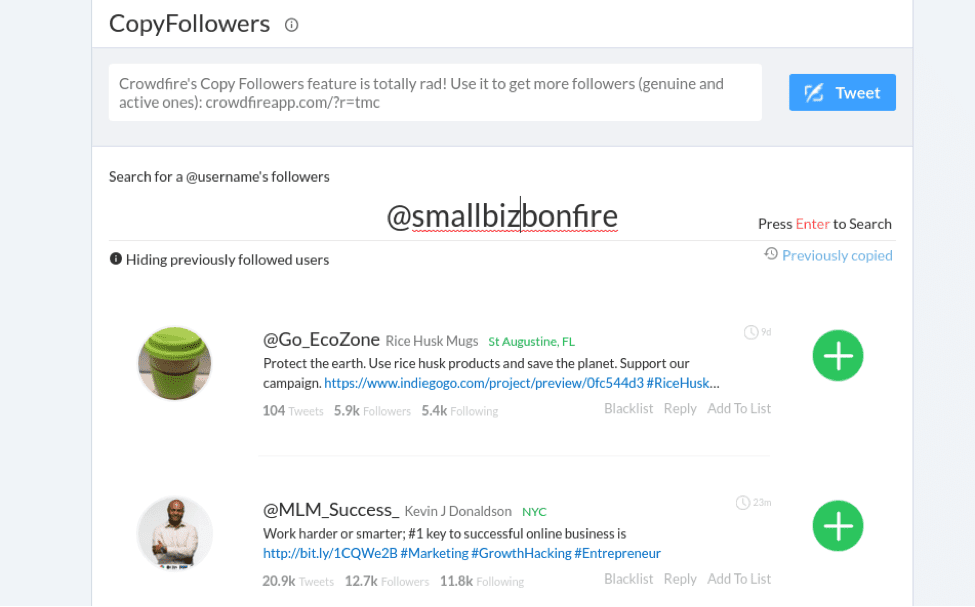
If you want more followers, the copying followers features is where Crowdfire is worth its weight in gold. The idea is that you should find similar accounts to yours and create relationships with their followers. This could be a competitor or not. All that’s important is that the account is similar enough to yours that the users who follow it would be interested in your account, too. A certain percentage will follow you back, helping you grow your own following.
At the top of the screen, type the name of the Twitter or Instagram account you’d like to copy. The app will return a list of the followers. You can peruse the information available for each account and decide whether you’d like to follow that account. If you would, click the green plus sign on the right. If you don’t want to follow and want to remove that account from your pool of possible accounts, click “Blacklist” and it won’t show up again.
Keyword following is very similar to copying followers. Just type the hashtag or keyword at the top and wait for the results. Check out the accounts associated with that keyword and follow the ones that interest you.
Tips for Using Crowdfire
Twitter has rate limits, which is just Twitter’s way of keeping automated apps from taking over the platform. You can’t follow, unfollow, or tweet more than a certain amount during a certain time. If you’re doing a lot of work with Crowdfire, you may find that you hit those rate limits often. Just wait a bit and go back to work.
Crowdfire is free for a basic account, but I would recommend you upgrade for at least one premium feature — the one that hides previously followed users. Otherwise, you will find yourself following and unfollowing from the same user pool over and over again. It’s going to be annoying to those users and you’re not going to make any headway overall.
Crowdfire also offers automation services. Use these with caution. Auto DMs or auto tweeting your stats can come off as spammy. Before setting these up, make sure that your followers will find value in them.